This site uses tracking information. Visit our privacy policy. Click to agree to this policy and not see this again.

The University of Iowa
and Department of Ophthalmology and Visual Sciences
Updated August 2026; Original April 17, 2017
Vision enhancement technology is changing at a rapid pace. With this in mind, the information in this document will be updated as often as possible.
Smart phones and tablets are helping people with vision loss do many things that in the past had to be done with more costly, stand-alone assistive devices.
IPhones and IPads are currently the best devices available for people with reduced vision or who are blind. This is because both devices have built in accessibility options including VoiceOver, a screen reader that lets a person know auditorally what is happening on their multi-touch screen and helps the person navigate the screen even if they have no vision. Additionally, the IPhone and IPad have Siri for voice commands.
VoiceOver and a number of other accessibility options on the IPhone and IPad can be activated by going to Settings, next General followed by Accessibility. In Accessibility, you will find a variety of vision enhancing as well as speech options.
With VoiceOver on the IPhone and IPad, you can run your finger over the screen and the phone will name the app you are touching.

Accessibility options for Android devices is also built into their operating system.

JoinMe is one of several apps that can be used in the classroom or any other place where an electronic whiteboard is being used that is hooked up to a projector or a computer. With this app, the person with vision loss can view what is being presented on the electronic white board on their smart phone or tablet.
For additional information on the go to www.join.me
SuperVision + Magnifier is the best free app for making the IPhone or IPad work like a video magnifier.
With a docking stand, an IPad and the SuperVision app, your IPad can become a stand-alone video magnifier.
For additional information go to (Apple App Store) | (Play Store)

BeMyEyes AI is a video support app for both Apple and Android devices that uses Artificial Intelligence to assist with visual tasks by fully describing the scene in front of the camera.
For additional information on the go to www.bemyeyes.com

Free iPhone app for naming currency.
For additional information on the go to (Apple App Store)

Free app similar to Seeing AI for Android devices.
For additional information on the go to (Play Store)

Another magnifier app for Android devices.
For additional information on the go to (Play Store)
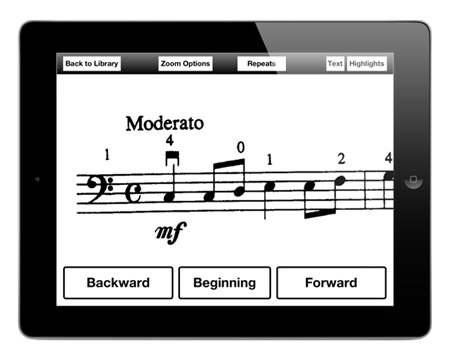
Music Zoom is an IPad app specifically designed for musicians who are visually impaired. It allows the musician to view their music with as much magnification as they need. And, using a wireless foot switch, they can advance through their music while keeping both hands on their instrument.
Simple menus with large fonts and high contrast controls allow the musician to customize the appearance of their music to best suit their needs. They can adjust the magnification to make the music as big as they want/need it. If white on black contrast is easier to see, tapping the “invert colors” button will switch to reversed contrast. The scrolling speed of the music and working distance can be matched to each musicians’ preferences and the demands of the piece.
A wide variety of IPad mounts exist, allowing the musician to attach their IPad to a standard microphone boom stand if desired. This will enable the musician to position their IPad at a comfortable viewing distance, while not obstructing their instrument.
For more information, visit www.MusicZoomApp.com.
Applevis at www.applevis.com is the Apple community-powered website for user’s who are blind or visually impaired using Apple's range of Mac computers, the IPhones, IPad, IPod Touch, Apple TV and Apple Watch.
Video support for a variety of products, including:
Can be found at https://hadley.edu/InstructionalVideos/
Also available from Hadley are videos on several subjects, including:
To access the Hadley website, scan the QR code below, or visit hadleyhelps.org.

Address
University of IowaLegal
Related Links
